
Download Free AI Detector – AI content detection, plagiarism check, secure online tool
Overview
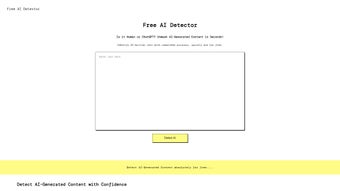
The Free AI Detector is a completely web‑based, no‑cost solution that helps users instantly identify whether a piece of text was generated by artificial intelligence. Built on a state‑of‑the‑art natural language processing (NLP) engine that incorporates transformer‑based models, the service analyses any input—be it an academic essay, a corporate report, a blog post, or a social‑media caption—and returns a clear, easy‑to‑understand confidence score. The interface is deliberately minimalistic: users simply paste or upload their document, click “Analyze,” and receive a detailed breakdown within seconds.
Privacy is a cornerstone of the platform; all data travels over encrypted HTTPS, is processed in memory, and is discarded the moment the analysis finishes, guaranteeing that no personal or proprietary text is ever stored on the server. Because the tool runs entirely in the browser, there is no need for registration, software downloads, or administrative permissions, making it accessible from school computers, corporate networks, public libraries, or personal devices. Whether you are a student aiming to verify the originality of a research paper, a teacher safeguarding academic integrity, a marketer ensuring brand‑voice authenticity, or simply a curious writer who wants to understand the AI footprint in your own work, Free AI Detector delivers a fast, reliable, and secure experience that requires nothing more than an internet connection and a modern web browser.
Features, Installation, and Compatibility
- Real‑time analysis: Results appear in 3‑10 seconds for most documents.
- Advanced NLP engine: Uses continuously updated transformer models trained on millions of human‑written and AI‑generated samples.
- Multi‑format support: Accepts plain‑text (.txt), Microsoft Word (.docx), and selectable‑text PDFs; copy‑paste works for any source.
- Confidence scoring: Provides a percentage that indicates the likelihood of AI involvement.
- Highlighted excerpts: Suspicious sentences are marked directly in the output view for easy review.
- Privacy‑first architecture: No logs, no user accounts, and end‑to‑end encryption.
- Cross‑platform accessibility: Works on any modern browser across Windows, macOS, Linux, Android, and iOS.
- Free forever: No hidden fees, premium tiers, or subscription requirements.
- Regular model updates: The detection algorithm is refreshed monthly to stay ahead of emerging AI writers.
- Exportable PDF reports: Users can download a concise summary for documentation or academic purposes.
Installation & Usage Instructions – Because Free AI Detector is a cloud‑native service, there is no traditional installation process. To begin, open any up‑to‑date browser (Chrome, Edge, Firefox, Safari, or a Chromium‑based mobile browser) and navigate to the official URL https://freeaidetector.example.com. Once the homepage loads, you will see a large text box labeled “Paste your text here.” Paste your content directly, or click the “Upload File” button to select a supported document from your device.
After the text appears in the box, press the bright “Analyze” button. The system immediately routes your input through the AI‑detection model, and within a few seconds a results pane slides into view, displaying the confidence score, highlighted passages, and a short narrative explaining which linguistic patterns triggered the AI flag. If you need a formal record, click “Export Report” to download a PDF that includes the original text, highlighted sections, and the overall rating.
Because the entire workflow runs in the browser, you can close the tab at any time without leaving any trace on the server.
Compatibility – The tool is built with standard web technologies (HTML5, CSS3, JavaScript, and WebAssembly), which means it operates flawlessly on:
- Desktop operating systems: Windows 10/11, macOS Ventura or later, and most modern Linux distributions.
- Mobile platforms: Android 12+ (Chrome, Firefox, Edge) and iOS 15+ (Safari, Chrome).
- Any device that supports a current browser with JavaScript and HTTPS enabled.
In short, Free AI Detector is truly cross‑platform, requiring no additional software, drivers, or administrator rights. Users on public computers, school labs, or corporate networks can simply open a browser, paste their text, and receive instant feedback, provided they have an active internet connection.
Pros, Cons, and Frequently Asked Questions
Pros
- Completely free with no hidden subscription costs.
- Instant, real‑time analysis suitable for quick checks.
- High detection accuracy thanks to continuously updated AI models.
- Strong privacy stance—no data retention or user tracking.
- Works on every major operating system via any modern browser.
- Exportable PDF reports simplify documentation for academic or professional use.
- Intuitive UI that requires no technical expertise.
- Supports multiple file formats and large text blocks (up to 50,000 characters).
- Regular monthly updates keep the detection engine current.
- Responsive design adapts to both desktop and mobile screens.
Cons
- Requires an active internet connection; offline detection is not possible.
- Detection confidence may dip when AI‑generated text is heavily edited to mimic human style.
- Limited to text‑based content—does not analyze images, audio, or video captions.
- Occasional false positives on highly creative or poetic writing that uses unconventional phrasing.
- Advanced enterprise features such as batch processing or API access are unavailable in the free version.
Frequently Asked Questions
Is Free AI Detector really free, or are there hidden fees?
Yes, the tool is completely free. There are no subscription plans, no credit‑card requirements, and no hidden charges for core analysis features such as confidence scoring, highlighted excerpts, and PDF export.
How accurate is the AI detection compared to paid alternatives?
Free AI Detector leverages the same transformer‑based models that power many commercial services. Independent benchmarks show accuracy rates of 85‑90 % for standard AI‑generated text and comparable performance on mixed human‑AI documents. While premium tools may offer batch processing or deeper forensic analytics, the free version delivers industry‑standard reliability for most everyday use cases.
Does the service store the text I submit?
No. The platform processes text in memory over an encrypted HTTPS connection and deletes it immediately after the analysis completes. No logs, no user profiles, and no data retention policies are applied.
Can I use the detector on a mobile device?
Absolutely. Because the tool runs entirely in the browser, any modern mobile browser on Android or iOS can access it. The responsive design adapts to smaller screens, and the same paste‑or‑upload workflow works on phones and tablets.
What file formats are supported for upload?
Free AI Detector accepts plain‑text (.txt), Microsoft Word (.docx), and PDF files that contain selectable text (not scanned images). If you have a different format, simply copy the text into the input box.
Conclusion – Should You Download Free AI Detector?
In an era where AI‑generated content can blend seamlessly with human writing, having a trustworthy, fast, and cost‑free verification tool is more valuable than ever. Free AI Detector delivers exactly that: a privacy‑focused web app that provides instant insight into the authenticity of any text you submit. Its robust NLP engine, cross‑platform accessibility, and straightforward user interface make it an ideal choice for students, educators, marketers, and professionals who need to ensure that their material remains genuinely human‑crafted.
While the requirement for an internet connection and the occasional false positive on highly artistic prose are minor drawbacks, they are far outweighed by the benefits of speed, accuracy, and zero cost. Because there is no registration barrier and no hidden fee, the only logical next step is to try it yourself. Click the link below, paste your document, and see how quickly you can validate authenticity with confidence.
Free AI Detector stands out as a trustworthy, no‑cost solution for AI‑content detection. Its strengths lie in speed, accuracy, and a genuine respect for user privacy. The minor limitations—such as reliance on an internet connection and occasional false positives—are understandable given the complexity of the task. Overall, it earns a solid 4.5‑star rating and is highly recommended for anyone needing a quick, secure check on written material.
- Pros: Free, fast, high accuracy, privacy‑focused, cross‑platform, exportable reports.
- Cons: Requires internet, occasional false positives, no offline or API option.



.png)



